Template studio
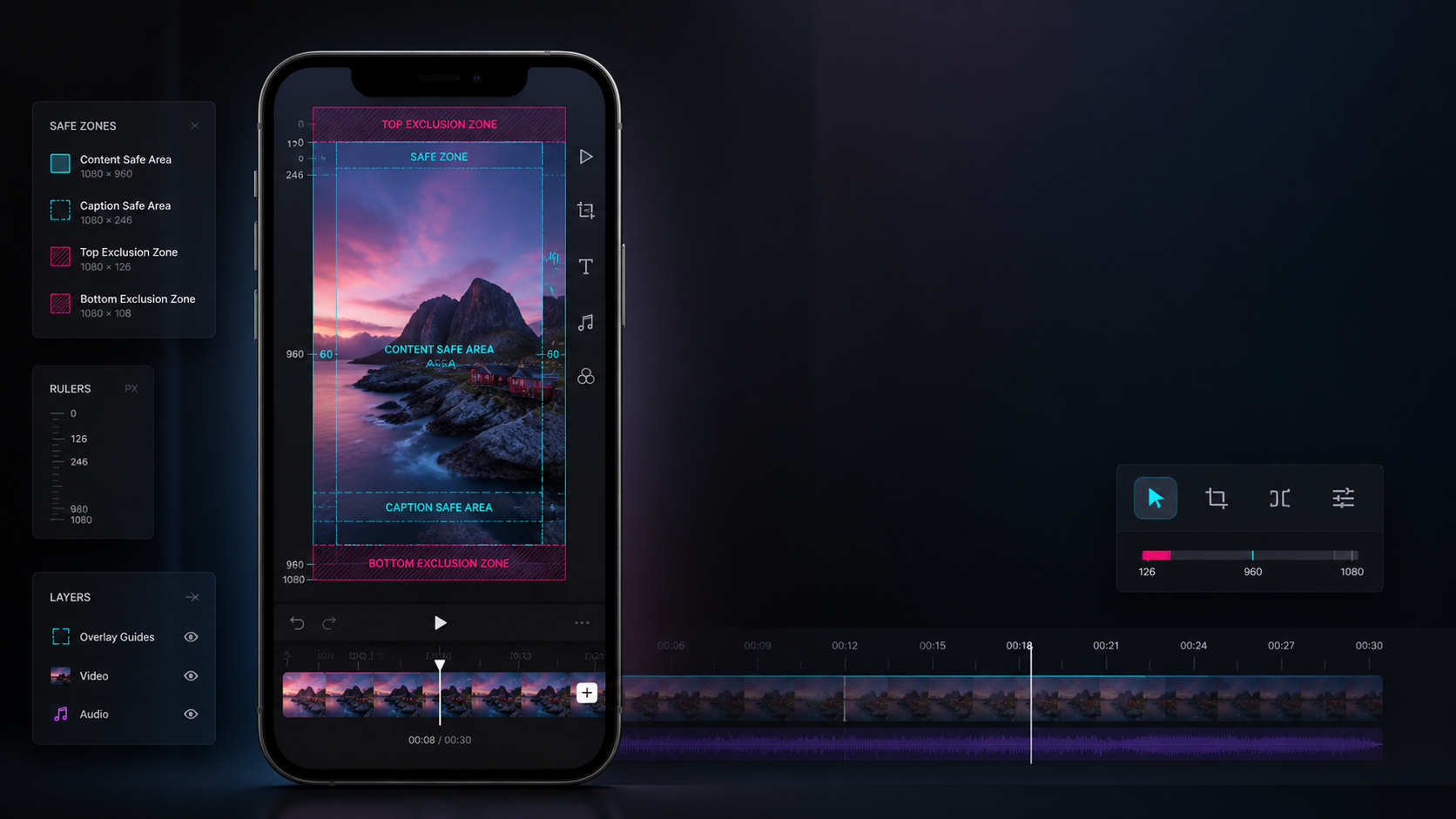
A TikTok safe zone template that looks like it belongs in a real edit room.
Use this reference when a vertical clip needs clear measurements, calmer subtitles, and enough room for the app chrome to stay out of the way.
Best forTikTok safe zone template
Good forShort-form editors and ad teams
Canvas1080 x 1920 vertical frame
- Keep the speaking face inside the middle column, not hugging the top banner.
- Drop subtitles early if the clip needs product tags or shop stickers later.
- Test one busy frame with the caption drawer open before calling the layout done.
- Use a still frame from the real edit, not a generic mock clip, when a client needs approval.
Frame measurements
Use these dimensions when subtitles, stickers, and offer text need breathing room.
Top exclusion zone
Leave this clear for the app header and profile chrome.
Caption-safe area
Keep subtitles and lower-third copy above this line.
Side breathing room
Helps stickers and text avoid crop anxiety on smaller screens.
Bottom exclusion zone
Reserve space for the caption drawer and action row.
Use cases
Pick the version that matches the way the clip will be published.
TikTok safe zone template
Keep the four exclusion bands close when subtitles, stickers, and CTA copy all need space in the same frame.
Caption safe area
Use this when subtitle lines, speaker tags, or promo text are fighting for the lower third.
TikTok text safe area
Place hook text, subtitles, offer copy, and shop labels without letting them crash into the UI.
TikTok ad safe zone template
Check this layout before an ad goes live with CTA buttons, shop treatments, and offer text turned on.
Instagram and TikTok safe zone template
Use one calmer vertical frame when the same edit needs to survive both feeds without a second export.
TikTok safe zone overlay PNG
Download a transparent 1080 x 1920 overlay PNG and drop it into CapCut, Premiere, Canva, or Figma.
Download template
Grab the export size, layer names, and review-frame checklist before handing the overlay to someone else.
Fastest real fixes
These are the fixes teams usually need before a revision round turns into rework.
Hook text
Keep it in the upper-middle lane so the search bar and profile chrome never clip the first line.
Subtitles
Treat the caption-safe area as a dedicated subtitle lane, not a parking lot for promo text.
Ads and shop overlays
Build the CTA-safe version first, then relax it for organic if the frame still feels empty.
Use the overlay, not guesswork
Download the guide asset or jump straight to the text-placement page.
The overlay route is the practical fix for editors using CapCut, Premiere Pro, Canva, or Figma. The text-safe guide handles hooks, subtitles, and promo copy placement.
Before you export
A short check here saves awkward crop surprises later.
- Set the 1080 by 1920 frame first and lock it before you animate text.
- Drop the safe bands over a real still from the edit, not a style board.
- Place subtitles and offer text inside the caption-safe block.
- Run one pass for TikTok-only delivery and one pass for cross-post use if Instagram is also in scope.
Quick answers
Short answers for the layout problems people search right before export.
What size should a TikTok safe zone template use?
Use a 1080 x 1920 canvas. Then treat the template as a placement guide layered on top of a real frame, not a replacement for the final edit.
Can one TikTok safe zone template also work for Instagram Reels?
Usually yes for talking-head clips, tutorials, and clean product demos, but you need calmer subtitle placement and a little more patience in the lower third.
What solves the problem fastest when text keeps getting covered?
Drop a transparent overlay PNG on top of the busiest frame in the edit. That shows whether the hook, subtitles, CTA, or shop labels need to move before export.